Este artigo está em inglês.
How I Built AgentHub: AI Agents That Run on a Schedule, Each in Their Own Sandbox
How does an agent actually run without you?
When people hear that I have AI agents doing real work for me, the thing they usually want to understand isn't what the agents do. It's how they keep working on their own, without me sitting there starting them.
That's the part I want to unpack here. I've written before about what my agents do, so this one is about how they run. Two ideas sit at the heart of it. The agents run on a schedule, and each one lives in its own separate environment. Once those two things are in place, an agent stops being something you use and becomes something that works on its own.
This post walks through both, in plain language, plus what I learned building the thing that holds it all together. I call it AgentHub.
What AgentHub actually is
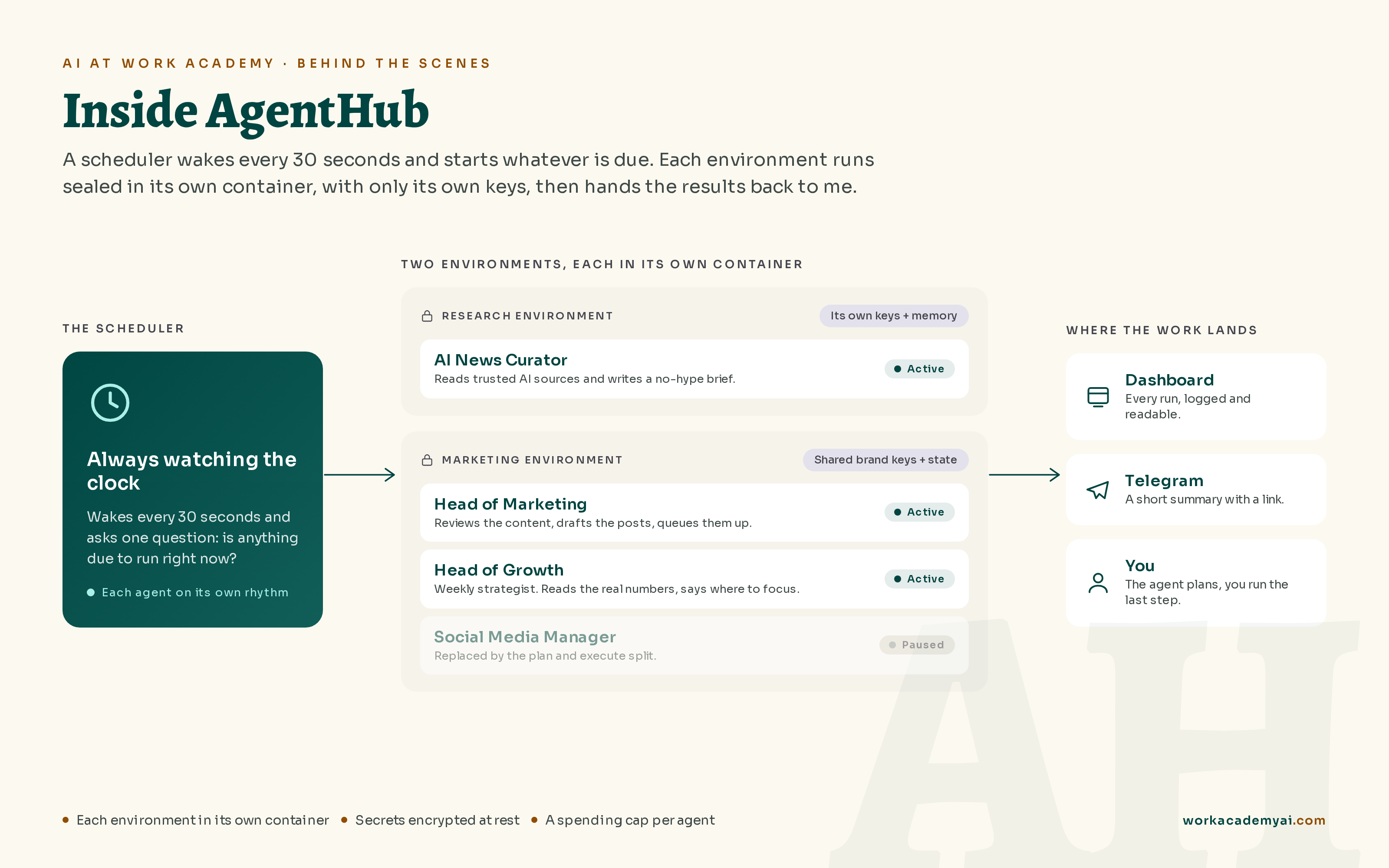
AgentHub is a small platform I built to run several AI agents independently. Each agent has one clear job, its own credentials, its own memory, and its own schedule. When one finishes, I either check its work in a simple dashboard or get a message on Telegram with a link to read.
Think of it like a tiny company of specialists. One agent reads the AI news and writes me a clean summary a couple of times a week. One acts as my head of marketing, turning rough ideas into drafted posts and a plan for what to publish next. And one acts as my head of growth, the strategist that sits down once a week, pulls the real revenue and signup numbers, studies what competitors are doing, and tells me where to focus next. They clock in on their own. I don't start them.
The whole thing runs on a cloud server that costs about 6 dollars a month. That detail matters to me, because the point was never to build something impressive. It was to get real help without hiring a team I can't afford.
Running on a schedule is what makes it an agent
Here is the simplest version of the idea. Inside the server there's a small program that wakes up every 30 seconds and asks one question: is anything due to run right now? If the answer is yes, it starts that agent. If the answer is no, it goes back to sleep and asks again 30 seconds later.
That tiny loop is the entire difference between AI you use and AI that works on its own. Nobody is clicking a button. The schedule decides.
Each agent has its own timing, and I deliberately spaced them out instead of running everything every day. The news agent works a couple of times a week. The marketing agent a few times a week. The growth strategist just once, on a Saturday. There are two reasons for keeping the gaps. First, a real gap gives each run a fresh window of data to work with, new posts, new numbers, instead of reporting on a day where nothing actually happened. Second, it keeps the to-do list from piling up faster than I can clear it.
I also added a couple of guard rails, because an agent that runs on its own needs limits. If a run somehow fires too close to the last one, it skips quietly instead of doubling up. And each agent has a monthly spending cap, so it physically can't run up a surprise bill on me. Those are the kinds of small decisions that separate a fun demo from something you can actually leave running.
Why each agent gets its own environment
This is the part I'm most glad I got right. The moment you give an agent access to tools and passwords, you have to decide what it should and should not be able to touch.
So in AgentHub I group the agents into environments. Think of an environment as a sealed room with its own set of keys, its own notepad, and its own browser. The deciding question is simple: do these agents work on the same thing or not? My news agent does its own job, so it gets its own room, and it cannot see any of the marketing logins. My marketing and growth agents work on the same brand, so they share a room on purpose, which means they can use the same accounts and pick up the same notes. The point isn't to wall everything off. It's to decide, on purpose, what should be shared and what should stay separate.
All the passwords and keys are encrypted before they're saved, and each environment can only ever reach its own. I recently rebuilt this part so that separation is enforced in three independent ways. Each environment now runs in its own sealed container, so the walls between them are set by the system itself, not by me. Each one is handed only its own keys, and never the master key that everything is locked with. And the database itself refuses to hand one environment another's rows, so even a stray query couldn't reach across. If any one of those three ever slipped, the other two would still hold.
No system is ever perfectly safe, and I won't pretend mine is. But for what this is, something I run for myself, I'm confident that one agent going wrong stays in its own corner instead of spilling into the rest. That was the whole point, to keep the worst case small.
This is the kind of boundary you don't think about until you've handed real access to something that runs while you sleep. Building it taught me to think less like "how do I make this work" and more like "what's the worst this could do, and how do I keep that small."
What's actually running on the server
If you opened up the server, you'd find a handful of small programs running side by side, each kept in its own container so they don't interfere with each other. One serves the dashboard I look at. One is the database, where everything lives. One quietly manages the secure web address so the dashboard loads over a proper encrypted connection. One is a little scheduler whose only job is to watch the clock and decide when something is due. And then there's a separate, sealed runner for each environment, which is the part that actually carries out that environment's work and can only ever touch that environment's own data.
The database is the memory of the whole system. It holds every agent, every past run, the encrypted secrets, and the notes each agent keeps for itself. That last part matters more than it sounds. An agent that only runs a couple of times a week has to remember what it did last time, otherwise it would happily write the same newsletter twice or repeat the same analysis. Memory is what lets it pick up where it left off.
None of this is exotic. It's a handful of well-understood pieces arranged so that the boring parts, scheduling, memory, and safety, are handled for me and I can focus on what each agent is supposed to think about.
Knowing what an agent should do, and what a human should
Here's the honest part, because I think the limits are more useful than the wins.
I wanted my marketing agent to post to social media on its own. It can't, and the reason has nothing to do with the AI. Platforms like X and Instagram are very good at spotting automated logins coming from a cloud server, and they block them quickly. I tried the direct route and got shut down within days.
So instead of fighting it, I changed the design. Now the agent does all the thinking on the server. It reads the numbers, drafts the posts, and writes a full plan as a clean document. Then it hands that document to me, and I do the final step from my own computer, where I'm already logged in like a normal person. The agent plans, I execute.
That split ended up being more reliable than trying to automate the whole chain. It also taught me something I keep coming back to: a big part of building good agents is knowing which steps to hand back to a human on purpose.
Built to be paused, not just built to run
One thing I'm quietly proud of is that I can shut the whole thing down cleanly whenever I want.
I can pause the agents and keep the dashboard up. I can stop everything but keep the server ready to switch back on. Or I can take a snapshot, delete the server entirely, and bring it all back later for a few cents. Nothing locks me in.
That matters because of how the costs work. The server is the only thing charging me by the month, and the AI itself only costs money on the runs that actually happen. So pausing the agents is enough to stop spending on the expensive part, without throwing anything away.
For me, being able to turn it all off cleanly matters just as much as getting it running. It's the difference between a project that owns you and a tool you actually control.
You don't need to build this, but here's what to steal
I want to be clear: you do not need your own platform to get the benefit of all this. I built AgentHub because I genuinely enjoy figuring out how tools work and making them work for me. Most people should not, and do not have to.
In fact, here is the shortcut I wish more people knew about. Everything I built by hand, the separate space each agent runs in, the memory that holds its work, the safe place for its keys, and the dashboard I check, is now something you can get without building any of it. Claude's managed agents handle all of that for you. You define the agent and the goal, and Anthropic runs the rest.
Whichever route you take, two ideas transfer to almost any setup. Put the work on a schedule so it happens without you. Then give each job only the access it needs.
The harder management question is whether a workflow is ready to run this way. If you are responsible for that decision, a free diagnostic is where we look at the owner, the human review, and whether one workflow is ready to try. You do not need to start with a cloud server. Start with one useful task and clear controls.
Dois caminhos
Escritório contábil ou negócio pequeno. A página inicial separa os dois.
Ver a página inicial