The Full Path · $97 lifetime
Ship your first working AI agent in 30 days.
Without writing a line of code.
The complete 9-module path: prompting, Claude Cowork, reusable Skills, no-code automations with Make.com, Claude Code, and building your own scheduled AI agent.
7-day money-back guarantee · No subscription · Lifetime access
New to this? Start with the free Cowork Quick Start →
Sound on for the full pitch · 50 seconds
What you’ll build
Four agents the course walks you through end to end. The Morning Briefing is the Module 9 capstone you build line by line. The other three are scenarios from the modules you can apply the same day.
Morning Briefing Agent
Reads your inbox, calendar, and active project files. Writes you a one-page briefing every weekday morning, before you sit down at your desk.
Module 9 capstone
Weekly Status Update
Pulls from your project notes and tasks. Drafts a manager-ready update every Friday in your voice, so you stop spending Fridays writing it.
Module 5 walkthrough
Competitive Intel Agent
Watches competitor sites and your keyword rankings weekly. Drafts a Week in Review for leadership with the changes that actually matter.
Module 9 scenario
Invoice Processor
New invoice email arrives. Extracts vendor, amount, and date. Updates your tracker. Flags anything over $5,000 for review. Every time, no exceptions.
Module 9 scenario
And you finish with a verified completion certificate, shareable on LinkedIn, public verify URL, downloadable as PDF.
An AI agent that helps you do more of what matters
By the end of the course, you’ll have built and scheduled your own AI agent. No coding, no dev tools. Here’s an example of one you could ship by Module 9:
Example: Weekly Briefing Agent
Every Monday at 8am, without me touching anything:
- 1.Scans my Gmail for emails from the last 7 days that need a reply, and ranks them by urgency
- 2.Pulls my calendar for the week and flags conflicts or back-to-back meetings with no prep time
- 3.Reads the latest notes from my project tool and identifies what moved, what’s blocked, and what’s overdue
- 4.Writes a one-page briefing with my top 3 priorities, drafted email replies, and meeting prep notes
- 5.Posts the briefing to a private Slack channel so it’s waiting for me with my first coffee
You’ll learn the exact pattern behind this in Modules 7 to 9: the instructions, the tools, the scheduling, and the safety checks. Then you’ll build your own on a workflow that matters to you.
Automations I actually run at work
Three real workflows I built using the exact patterns taught in this course. Every one of them runs automatically and saves me hours every week.
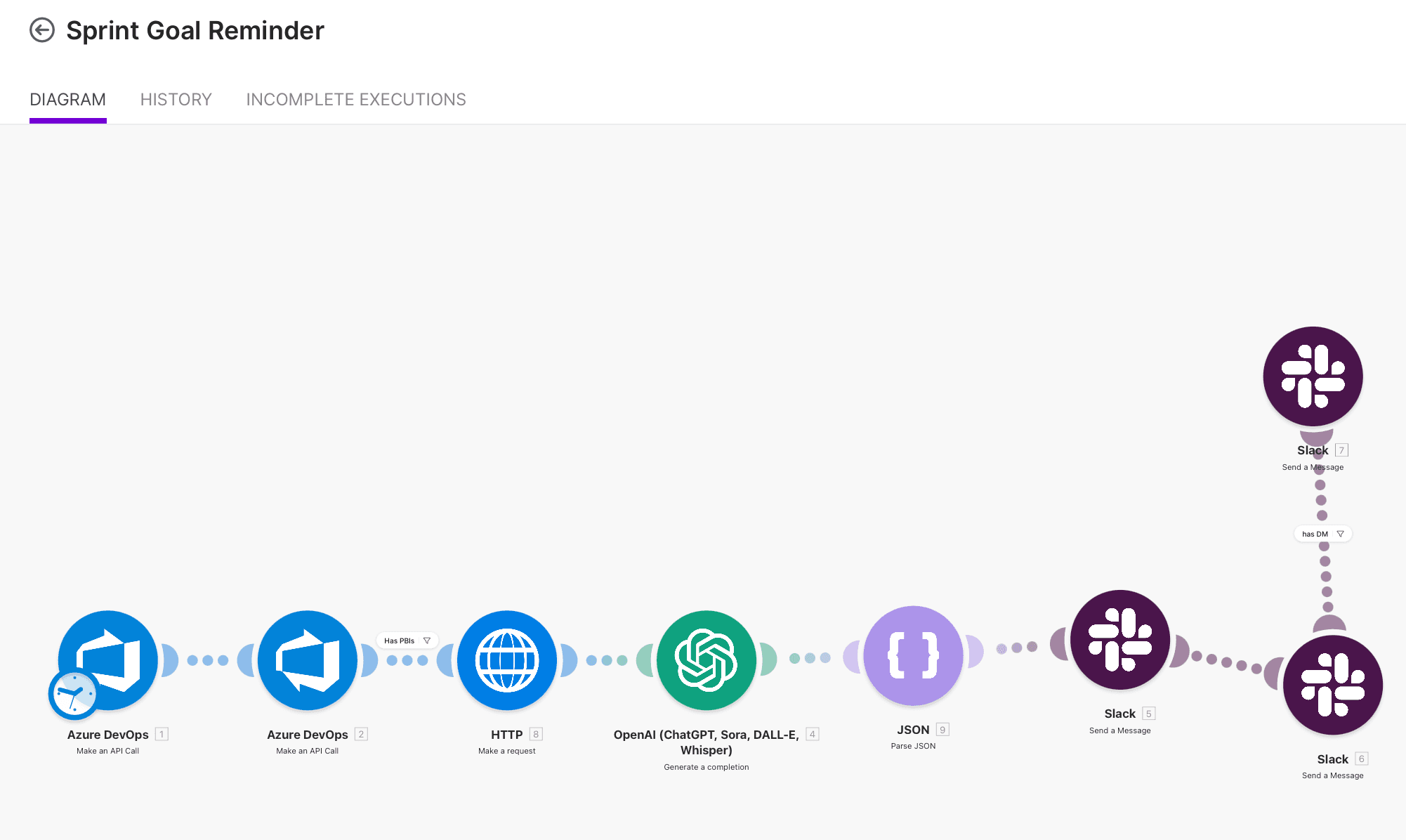
Built with Make
Sprint Goal Reminder
Every Monday and Wednesday, pulls active sprint items, asks OpenAI to write a friendly goal reminder, and posts it to the team channel and owners.
Mon & Wed 9am · Module 6 pattern
Built with Claude Code
Deployment Manager Agent
Checks which deployments stalled, clears stale dates from the board, and notifies the team on Slack. No more manual rescheduling.
Runs Tue/Wed/Thu 6pm · Modules 7 to 9 pattern
Built with Claude Code
Technical Qualification Agent
Reads a new work item, explores the config repo, figures out what’s needed, writes the acceptance criteria, and summarises it to Slack.
Saves ~30 min per item · Modules 7 to 9 pattern
You’ll learn the exact building blocks behind each of these, then pick the automation that matters most in your own job and ship it.
9
Structured Modules
30+
Copy-Paste Prompts
1
AI Agent You Own
Lifetime
Access, No Subscription
Common questions
No. This course is built entirely for non-technical professionals. If you can send an email, you can follow every module. No coding experience required.
Yes. If you buy the course and within 7 days you don’t feel it was worth it, email us and we’ll refund you in full, no questions asked. Module 1 is also completely free, so you can try it before paying anything.
The course focuses on Claude because every module builds on its ecosystem: Claude Cowork, Skills, Claude Code, and the AI agent you’ll build by Module 9. Your prompting skills transfer to ChatGPT, Gemini, or any other tool, but you’ll follow one path so you can actually ship an agent by the end.
The course itself is a one-time $97. A few modules use optional paid tools (Claude’s paid plan for Cowork, and Anthropic API credits for the Make module) which typically cost a few dollars a month. I walk you through setting a $5 monthly spending limit so you can never get a surprise bill. You can complete most of the course on free tiers.
Yes. After you complete all 9 modules you can claim a verified completion certificate. It lists the specific skills you demonstrated, shows the date and a unique verification code, and lives at a public URL anyone (an employer, your manager) can open to confirm it is real. Shareable on LinkedIn, downloadable as PDF.
Some companies restrict external AI. You can still complete the course on personal accounts and apply what you learn at home or on side projects. If your company allows enterprise-approved AI (like Claude for Enterprise or ChatGPT Enterprise), everything in the course translates directly.
For the first six modules, no. Everything runs in your browser. Modules 7 to 9 introduce Claude Code, which is a desktop tool you install in a few clicks (no coding, no terminal setup). I walk you through it step by step.
The 9 modules total 4 to 5 hours of active learning. Most people complete 2 to 3 modules per week and finish in under a month. You go at your own pace, with no deadlines.
Yes. AI tools change fast and I update the modules as features evolve. Lifetime access means you get all future updates and any new modules I add, at no extra cost.
No. It’s a one-time payment for lifetime access. Pay once and keep the course, including any future modules and updates I add.
Start free. One payment, lifetime access.
Module 1 is fully free, and you can preview the intro of every other module without signing up. No credit card. If it’s useful, the Full Path is a one-time $97 for lifetime access.
🛡️ 7-day money-back guarantee · No subscription · Lifetime access
Want a smaller first step? Start with the free Cowork Quick Start →